Contents 4
When you revise an ad performance report several times in one conversation, you hit a slightly odd moment.
"Count conversions by completed purchases."
You clearly said this at the start, and yet before you know it the AI is counting add-to-carts as conversions too. Tell it again and it fixes it just fine.
You could open a new conversation and start the report over, but you rarely feel like doing that. Part of it is the thought, "Do I have to explain everything from scratch again, the materials to look at, the month to compare and even the table order?" And part of it is the feeling that the AI in the current conversation more or less knows this work. So you usually end up piling revision requests onto the same conversation.
But if the AI really understands this report, why does it forget the conversion rule stated at the start?
How does AI remember a conversation?#
AI doesn't keep a conversation in memory the way a person does. Every time it writes an answer, it rereads the conversation so far from the beginning. In fact, even the feeling that the AI knew the report came from it rereading the explanations in the conversation each time.
If so, the conversion rule stated at the very start should be reread with every answer too. It still gets missed because there's a limit to how much AI can read properly at once.
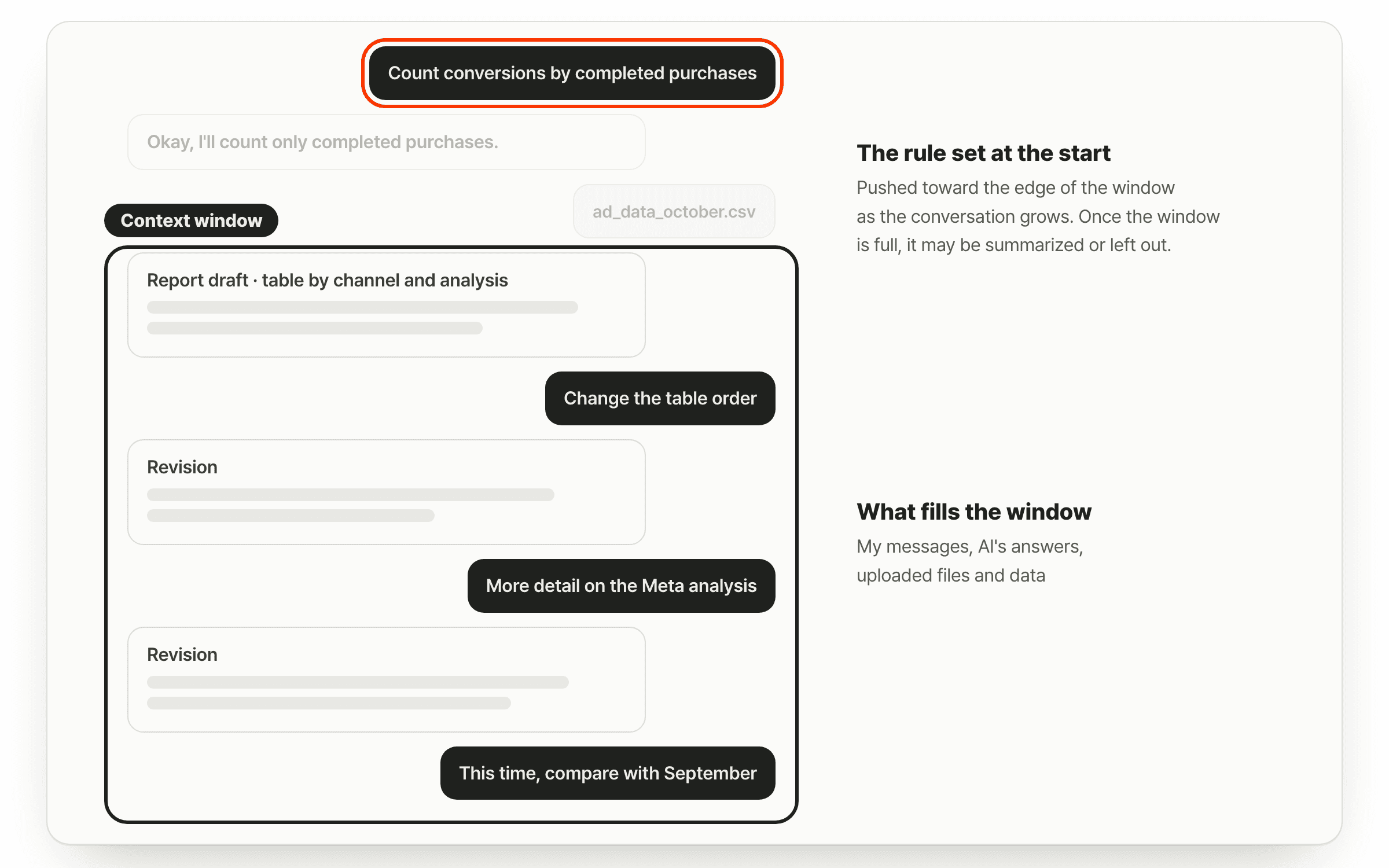
The context window is the amount of text AI can read at once. It isn't only the revision requests you send that count toward it. The report drafts AI wrote, the files uploaded to the conversation and the data pasted in all share the same window.
In fact, it's often the answers AI writes, more than what you write, that fill the window quickly. The conversion rule is one sentence, but if a report draft is around 2,000 characters each time, five revisions pile up 10,000 characters of drafts alone. An ad data file uploaded along the way can be far longer than that. The more there is to read, the smaller the share taken up by that one sentence from the start.
A rule that has shrunk to so small a share doesn't stand out to AI either. Anthropic, the company that makes Claude, explains in its September 2025 engineering post "Effective context engineering for AI agents" that as more content goes into the window, AI's ability to accurately recall information from it goes down. It also says this is a characteristic of all models, though to different degrees. That's why AI misses the rule stated at the start even when the window isn't full yet.
Then you might wonder whether a plan with a bigger context window would keep the rule from getting missed. The size of the window does differ quite a bit by plan. Take Gemini. According to Google's help page (as of November 2026), it's 32,000 tokens (the units AI splits text into to read it) on the free plan and 1 million tokens on AI Pro and above, about thirty times as much. But accuracy drops as more content goes in even when the window is big, so I think a big window only slightly delays the point where the rule gets missed.
What happens to what you said earlier when the context window fills up?#
Whether the context window is big or small, it fills up at some point if the conversation keeps getting longer. At that point the rule set at the start isn't just buried. It may drop out of the conversation altogether. That's because the early part of the conversation doesn't stay as it was, whether the service tells you the window is full or quietly summarizes it.
The ChatGPT help pages explain that when a conversation fills up, you can summarize it and continue, but details may be lost at that point. Claude, when code execution is turned on, summarizes earlier messages on its own and continues the conversation.
Summarizing and continuing on its own, the way Claude does, is convenient, but it makes it hard to notice that the early part of the conversation has shrunk. The conversation doesn't break off, so you carry on working without knowing. You can't choose what stays in the summary either.
When the AI was counting add-to-carts as conversions, it may have been after the early part of the conversation was summarized and the conversion rule dropped out. The longer you pile revision requests onto the same conversation, the more likely this is to happen. That's also why the ChatGPT, Claude and Gemini help pages all recommend opening a new conversation in some situations.
What does AI remember when you start a new conversation?#
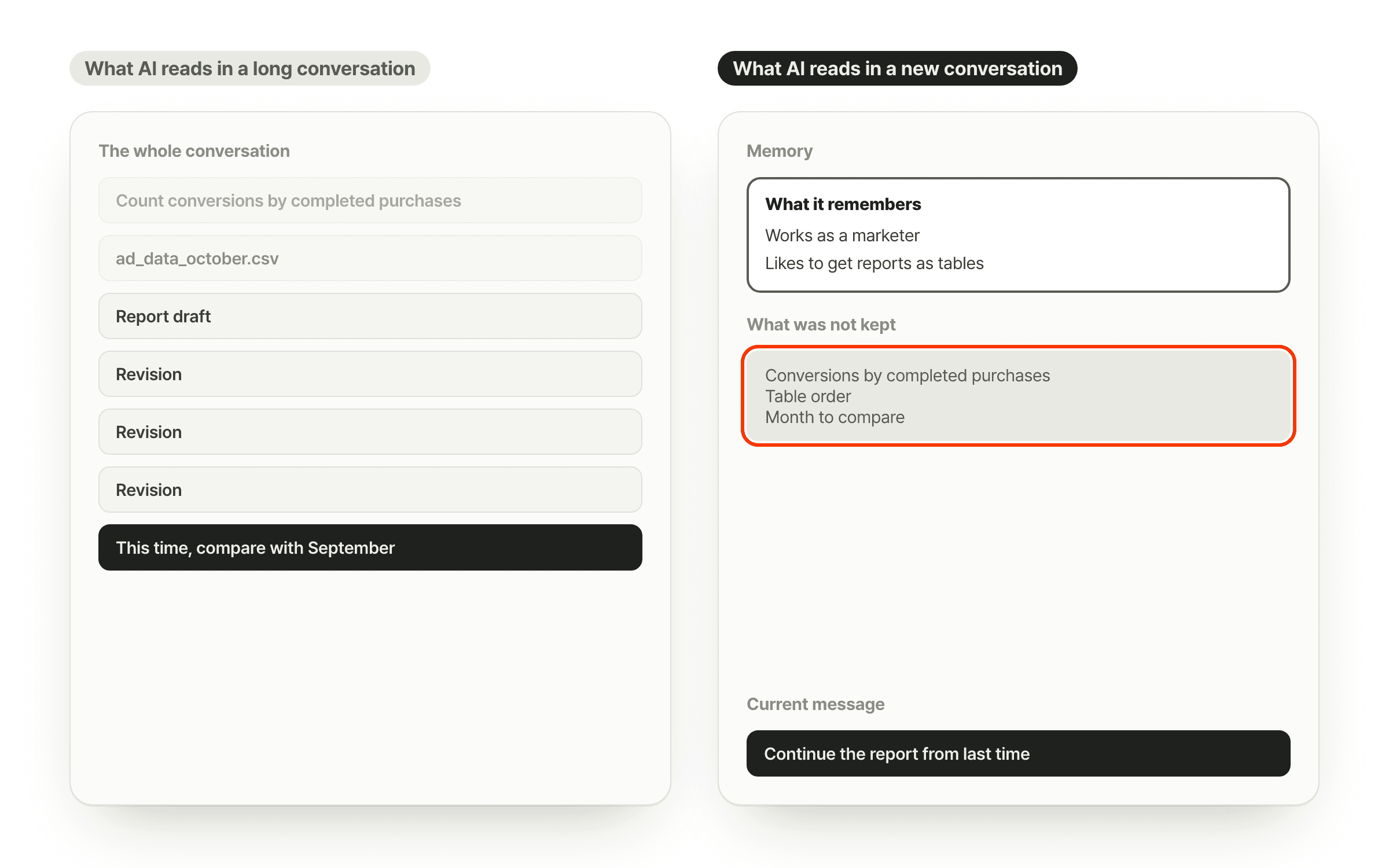
It goes without saying, but when you open a new conversation, AI doesn't know the details of the work you were doing in the previous one. That's because the only conversation data the AI in that chat window can see is the conversation you just opened. Detailed context and instructions, like which materials to look at, which month to compare and what to count as a conversion, have to be given again from the start. The AI in the earlier chat window did overlook the rule now and then, but at least it was reading that conversation every time. Naturally, you start to miss that AI. Of course, the AI in the new conversation has the information about you saved in memory, so it doesn't start out knowing nothing at all.
Memory is a feature where AI picks out and keeps some of what it learned in past conversations and draws on it in new ones. The ChatGPT help pages also explain that memory doesn't retain the details of every conversation. That I'm a marketer, or that I like to get reports as tables, may stay, but I wouldn't count on it keeping the fact that this report counts conversions by completed purchases.
There are also features that have AI find and read past conversations. These are Claude's search of past chats (paid plans) and ChatGPT's chat history reference. But these features also work by AI picking out the conversations it judges necessary at the moment, so there seems to be no guarantee that they bring back every rule you set. For the rules of work in progress, I think the reliable way is to put them into the new conversation yourself instead of leaving them to memory or search.
How to move long-running work to a new conversation#
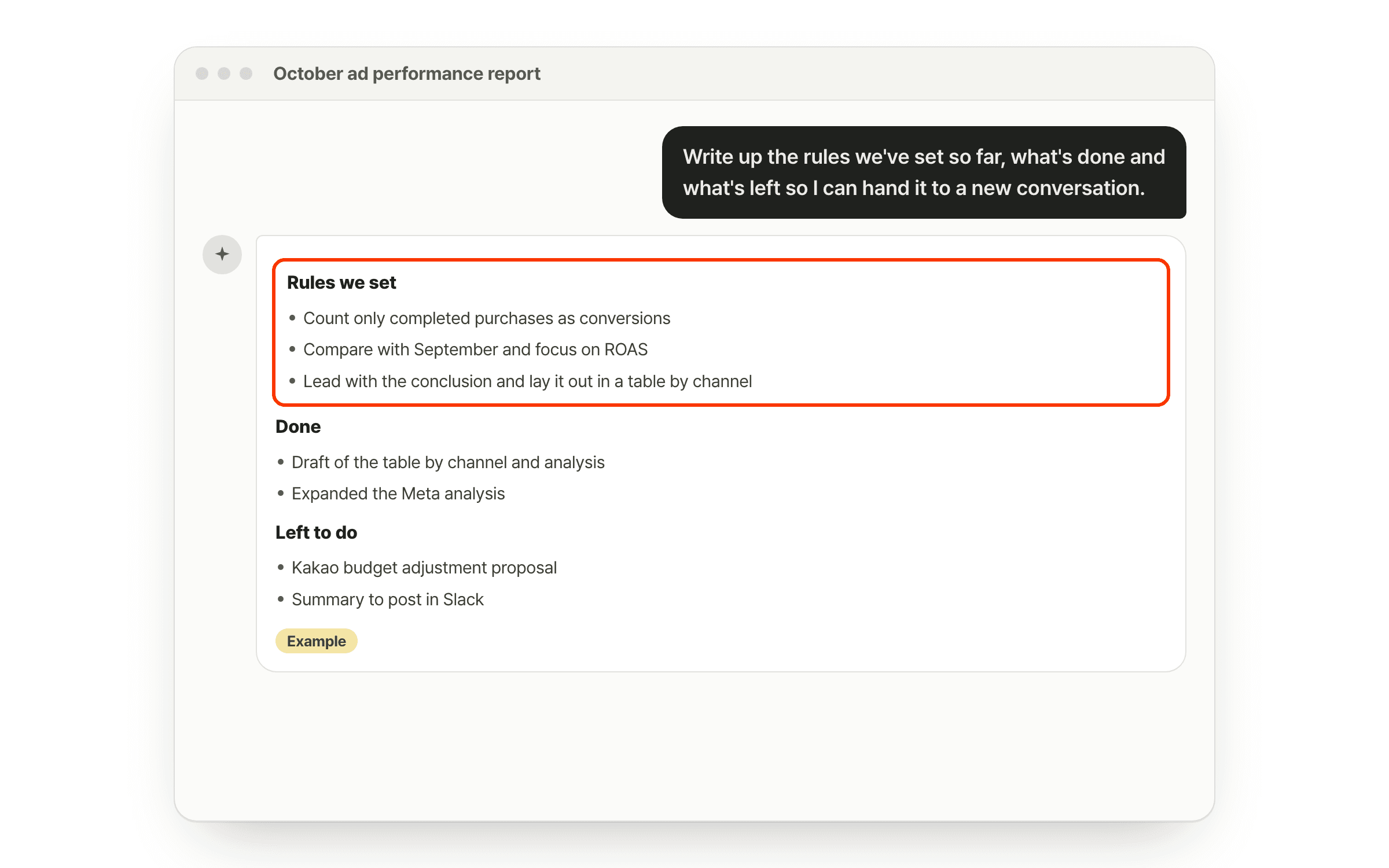
If you kept using the same conversation because explaining the work from scratch in a new one was a hassle, you can have the AI write that explanation first. Pasting its write-up in unchanged makes me a little uneasy, though. The write-up is a shortened version of a long conversation, so some rules may be missing. It's a good idea to add a step between the write-up and the new conversation where you check it yourself.
- Ask the AI in the current conversation: "Write up the rules we've set so far, what's done and what's left so I can hand it to a new conversation."
- Read the write-up and fill in any missing rules. The earlier in the conversation a rule was set, the more easily it gets dropped, and you'll spot the gaps quickly if you reread the first few messages.
- Put the checked write-up in as the first message of the new conversation and ask it to continue the work. The AI in a new conversation usually can't read files uploaded to the previous one, so upload them again if needed.
It's better not to wait too long to move the work to a new conversation. The longer the conversation gets, the more rules go missing from the write-up AI makes. The screen usually doesn't show how full the context window is, so one option is to move when a unit of work, such as one report, is finished. And if the AI has missed a rule set at the start even once, it's better not to put it off any longer.
After moving a write-up to a new conversation a few times, you start to notice rules you put in the same way every time. Like counting conversions by completed purchases in every monthly report. You can write rules like these once in the instructions field of a project in ChatGPT or Claude. AI reads the instructions first in every conversation you open in that project, and unlike memory, they're read exactly as you wrote them. But they also count toward the amount AI reads, so it's best to keep only the rules you need every time, and keep them short.

I am a growth marketer who consults on growth marketing and AI adoption.