Contents 4
It seems like it would be really convenient to hand the monthly ad performance report over to AI. But right before you drag the Excel file into the chat window, you've probably thought at least once, "This is company data. Is it okay to upload it?" After that hesitation, you either decide not to put it in at all or just upload it without much thought.
The worry about whether it's okay to upload company data isn't unfounded. In March 2023, the Korean business magazine Economist Korea reported that within 20 days of Samsung Electronics' semiconductor division allowing ChatGPT use, there were three cases of internal information being entered (this was not officially announced by the company).
The information entered included things like the source code of an equipment measurement program and a transcript of a recorded meeting. This didn't start with a hack. It started with data that employees put in themselves to finish their work faster. And they entered it into ChatGPT, which the company had allowed them to use.
I think the question of whether you can put company data into AI can't be answered just by asking "Is AI safe?" Even with the same AI, the answer changes depending on your training setting, what your company permits, and what you actually put in. In this post I'll look at where the data you put in stays and for how long, based on the official guidance from ChatGPT, Claude and Gemini as of November 2026. Then I'll go through how to choose what to put in, in this order: training settings, company rules and the type of data.
Where does company data uploaded to AI go?#
Company data uploaded to an AI chat goes to the service provider's servers. The moment you upload an ad performance Excel file to the chat window, a copy of it is created on the servers of OpenAI, Anthropic or Google. That's because the AI model that produces the answer runs on those servers. The source code and meeting content that the Samsung Electronics employees entered, as we saw earlier, also went to servers outside the company this way.
Once it's on the server, what happens to company data? Going by the official guidance from ChatGPT, Claude and Gemini, that data can be retained, used for training and reviewed by people.
- Retention: The conversation history stays in your account and on the service provider's servers. It's there until you delete it, and it stays for a certain period even after you delete it.
- Training: What you put in is used as material for building the next AI model.
- Human review: Employees or contractors of the service provider read conversations to check quality and safety.
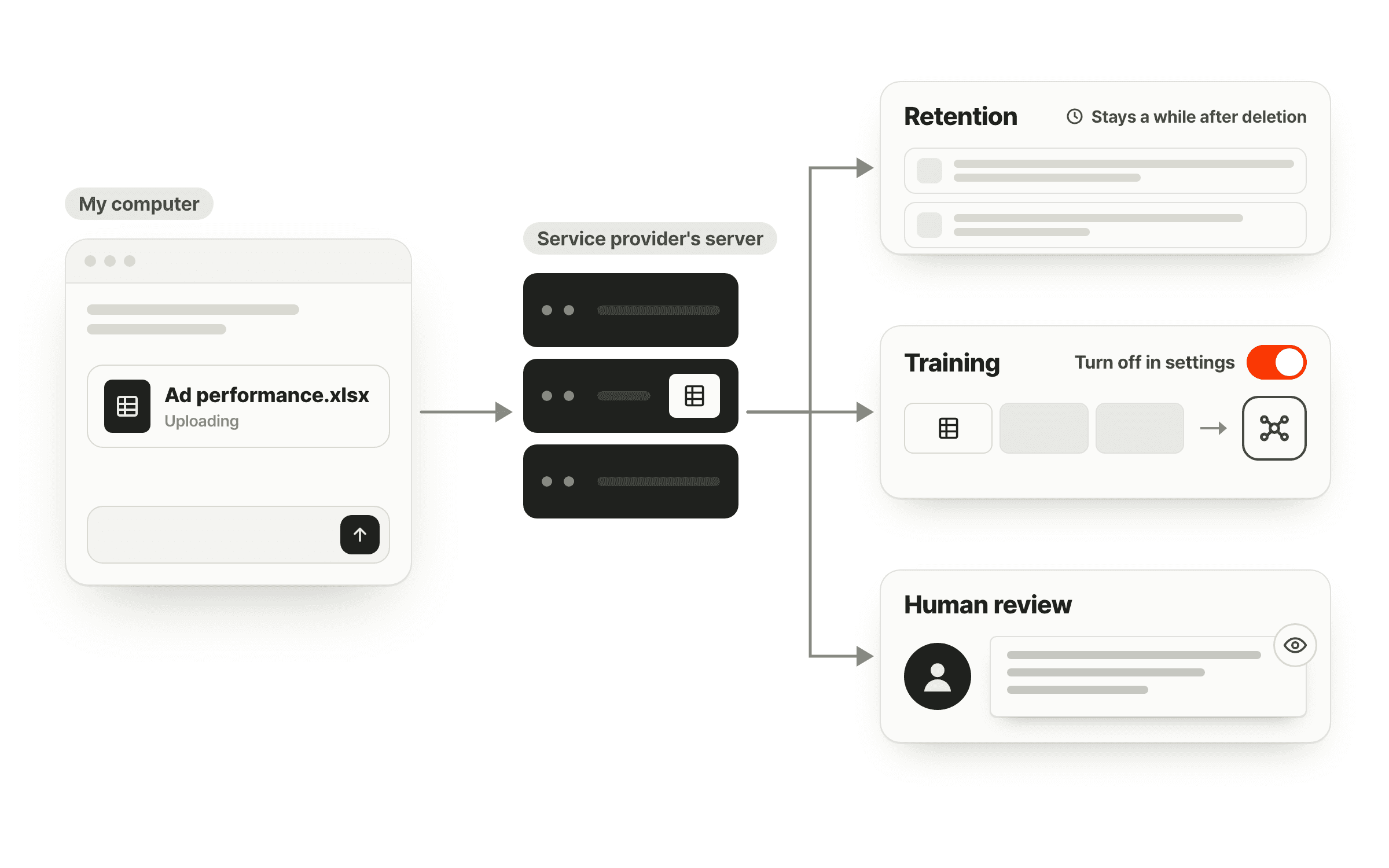
Retention and human review are decided by the service provider, so users can't choose them. The only one you can turn off in settings is training. So let's look at the training setting first.
How do you turn off training in ChatGPT, Claude and Gemini?#
On the personal plans of ChatGPT, Claude and Gemini, your conversations can be used for training, and every one of them lets you turn training off in settings. Whether this setting is on by default, though, differs by service.
ChatGPT has training on your conversations turned on from the start, so unless you turned it off yourself, it's still on. Claude has you choose at sign-up whether to allow your conversations to be used for training, and Gemini uses your conversations for training if [Keep Activity] is on. But if you signed up a long time ago, it's hard to recall what you chose back then. The surest way is to open the settings screen of the account you're using now and take a look.
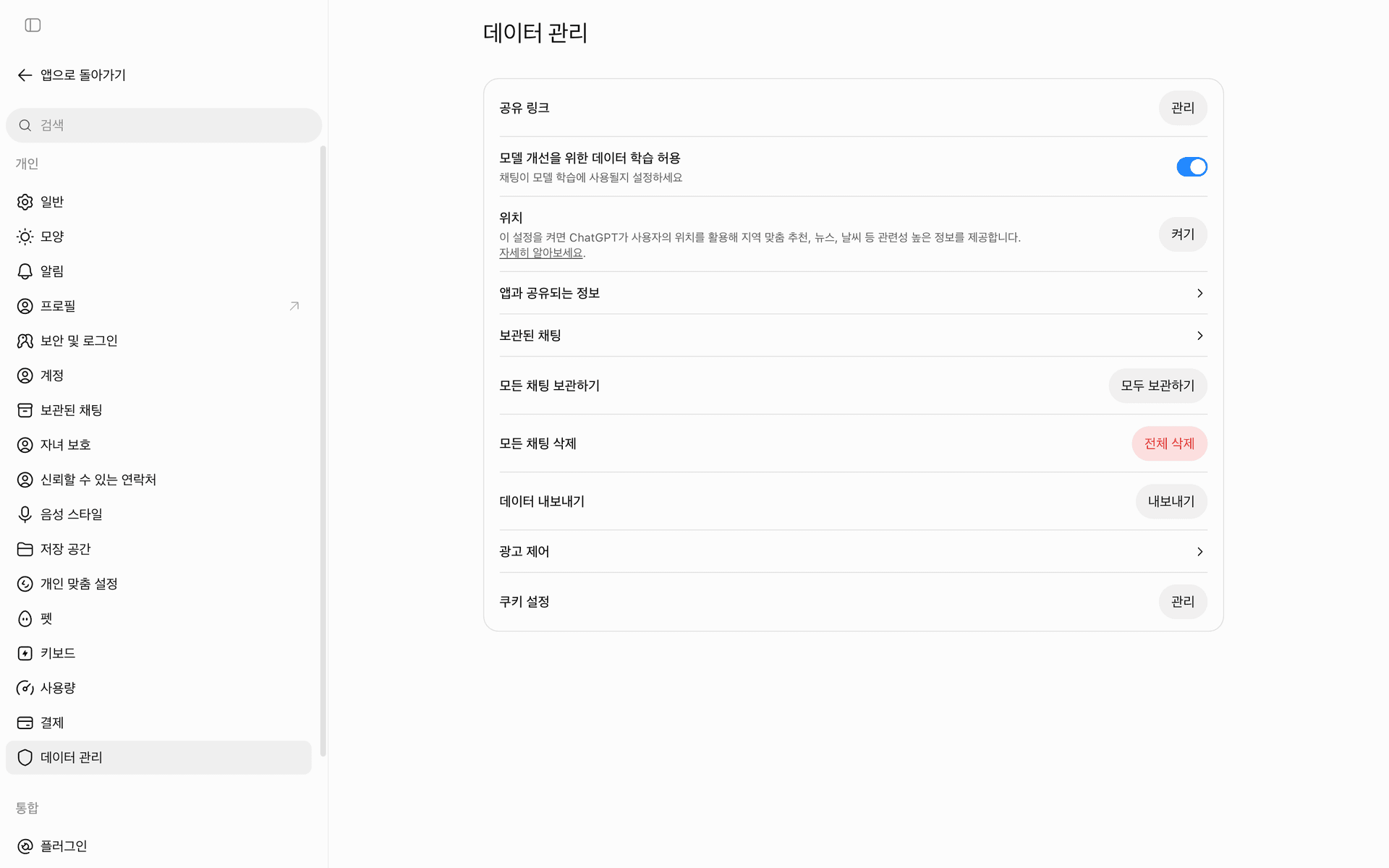
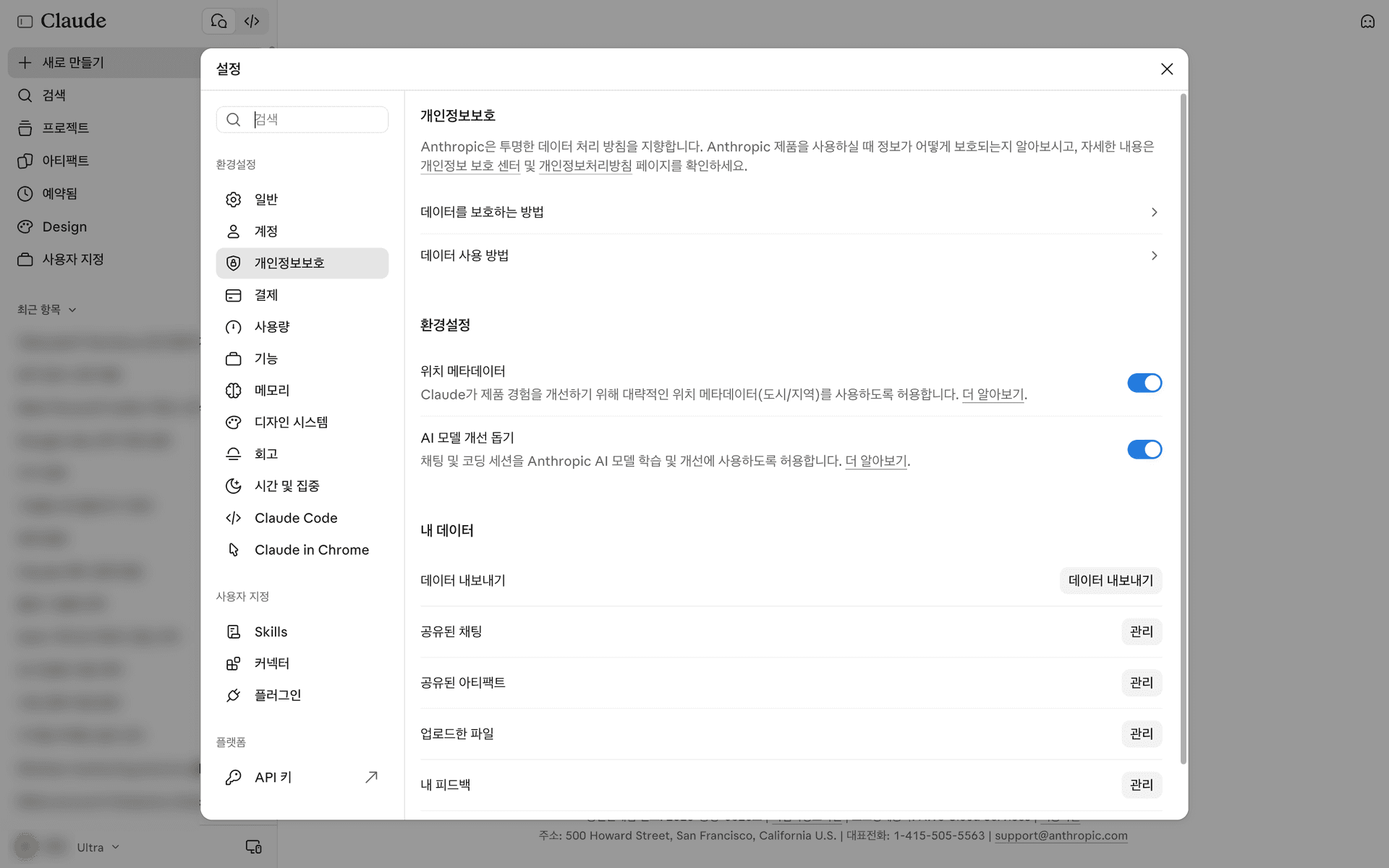
Turning training off applies to the conversations you start from then on. Claude says that conversations you had before turning training off are not removed from training that has already begun. If you turn it off after putting company data in, that data may already have been used for training. So I think the right time to check the training setting is before you put company data in for the first time.
If you've already put company data into a personal account, you can start by turning the training setting off now and deleting that conversation. If the data was personal or confidential information, it's also a good idea to tell the person in charge of security at your company.
There are also times when you think, "I only need to ask about company data this once, and changing the settings is a hassle." If you want to keep just that one conversation out of training, you can use a chat that leaves no history. [Temporary chat] in ChatGPT and Gemini and [Incognito chat] in Claude aren't saved to your chat history or memory and aren't used for training.
What about the work account you use at your company? Are those conversations used for training too? For ChatGPT Business and Enterprise, Claude Team and Enterprise, and Gemini in Google Workspace, each service provider states that by default it doesn't use the data for training unless the customer allows it. With a work account, training is effectively off from the start, without your having to turn it off yourself. I'll come back to the point that your company's admins can see members' conversations when we get to company rules.
Here are the training settings in a table (as of November 2026).
| Service | Training on personal plans | Where to turn training off | Chat that leaves no history | Training on business plans |
|---|---|---|---|---|
| ChatGPT | Used by default (Free, Plus, Pro) | [Settings] > [Data controls] > [Improve the model for everyone] | [Temporary chat] | Not used (Business, Enterprise) |
| Claude | Used as chosen at sign-up (Free, Pro, Max) | [Settings] > [Privacy] > [Help improve Claude] | [Incognito chat] | Not used (Team, Enterprise) |
| Gemini | Used if [Keep Activity] is on (personal accounts) | [Settings] > [Activity] > [Keep Activity] | [Temporary chat] | Not used (Google Workspace) |
If you just turn training off, then, can you upload the ad performance Excel file with peace of mind?
What remains even with training off: retention periods and human review#
Turning training off isn't enough on its own. Even with training off, company data doesn't disappear from the server right away. That's because the training setting blocks only one thing, the data becoming material for the next model. How long it stays on the server and when people at the service provider see it are separate matters.
Say you uploaded the ad performance Excel file, got the analysis and deleted the conversation right away. Even so, the Excel file stays on the service provider's servers for a while. ChatGPT and Claude remove deleted conversations within 30 days, and Gemini keeps conversations for 72 hours even when [Keep Activity] is off. An Excel file uploaded in [Temporary chat] or [Incognito chat] stays for a while in the same way (I've put the retention period for each service in the table below).
But there are cases where conversations deleted in ChatGPT stay longer than 30 days. ChatGPT says it may keep them longer if there is a security issue or a legal obligation. In fact, OpenAI said in an official post that in its lawsuit with The New York Times a court ordered it to preserve even deleted conversations, so it couldn't delete them until September 26, 2025, when that order ended. Since a conversation deleted on screen sometimes isn't deleted on the server, it seems hard to consider the matter closed once you've deleted it.
In Claude too, some conversations stay longer than 30 days after you delete them. Conversations where you clicked thumbs up or thumbs down stay for up to 5 years, and the inputs and outputs of conversations flagged as policy violations stay for up to 2 years. You only clicked thumbs up because you liked the answer, and yet a conversation with company data in it can stay for 5 years. A deleted conversation is gone within 30 days, but a single thumbs up turns that into 5 years, so in conversations where you've put company data, it would be better not to click thumbs up or thumbs down.
What about cases where people at the service provider read conversations? Google is the one that spells out human review most clearly in its official guidance. It says that people review some conversations in the personal version of Gemini and that those conversations are kept for up to 3 years.
That is also why Google separately tells you not to enter confidential information that reviewers shouldn't see: people can review conversations regardless of the training setting. In other words, even data that isn't used for training can be read by a reviewer.
Here is what remains even after you turn training off, in a table (as of November 2026).
| Service | How long it stays on the server | Retention for chats that leave no history | Conversations that stay longer |
|---|---|---|---|
| ChatGPT | Removed within 30 days after you delete it | 30 days | Conversations with a security issue or a legal obligation |
| Claude | Removed within 30 days after you delete it (if you haven't allowed training) | 30 days | Conversations where you clicked thumbs up or thumbs down (5 years), conversations flagged as policy violations (2 years) |
| Gemini | 72 hours even with [Keep Activity] off | 72 hours | Conversations reviewed by people (3 years), conversations you sent feedback on |
Going back to the ad performance Excel file, even with training off, that file stays on the server for a while and in some cases a reviewer may see it. So I think of the training setting as a safeguard that lowers the risk of data becoming material for the next model. I don't think we should read having training off as permission to put in any company data.
How, then, should we judge whether company data can go into AI? The training settings and retention periods we've seen so far are rules set by the service provider. But which data may be sent to servers outside the company is decided by your own company, not by the service provider.
What company data can you put into AI, and what should you leave out?#
To decide which company data goes into AI, look at company rules first and then at the type of data. If your company has rules on AI use, start by finding out whether they say which services and plans you can use and which data must not be put in.
If your company uses a business plan, I think the right thing is to use company data in that account and not in a personal one. As we saw earlier, conversations in a work account aren't used for training by default. And in ChatGPT Business, workspace admins can view and export members' conversations, so the company can check where the data went. That also means admins can read the company data you put in.
When you look at company rules, it's best not to stop at whether you're allowed to use AI services. You might think, "The company said we can use ChatGPT, so putting company data in must be fine too." But the Samsung Electronics case also happened after the company allowed ChatGPT use. So when you read the rules, you also need to check which data you're allowed to put in.
Even within the scope the rules set, you have to judge for yourself whether to put in each piece of data. The rules don't decide every piece of data for you. In those cases, think back to the retention periods and human review we saw earlier. Even with training off, the data stays on the server for a while and in some cases a reviewer reads it.
So the question to judge by is "Is it okay for this data to stay on the service provider's servers and be read by a reviewer?" Some data is hard to put in as is but becomes fine once you take out client names and contact details. Here is how company data sorts out under that question.
| Type of data | Examples | If it stays on the server | Decision |
|---|---|---|---|
| Public data | Press releases, company website posts, reports already published | No problem, since it's already outside the company | Put it in as is |
| Internal data | Ad performance reports, sales totals, meeting notes | Without the names, it's hard to tell whose data it is | Remove client names and information that can identify individuals, and put in only the parts you need |
| Personal and confidential information | Customer lists and contact details, passwords and account information, contract terms, unreleased results | Staying there is the problem in itself | Don't put it in (unless company rules specifically allow it, and then only as the rules say) |
The decision not to put in personal and confidential information isn't just my own standard. Anthropic recommends not putting very sensitive data into Claude, such as financial information, health records, passwords and confidential business documents.
That said, I don't think you need to keep company data out altogether. Even with only public data and internal data with client names removed, there's a lot of work you can hand to AI.
Going by the table above, the ad performance Excel file falls under internal data. You can remove client names and contact details in the following order.
- Change client names to something like Company A and Company B.
- Delete the columns that hold contact persons' names, contact details and account IDs.
- Leave out the sheets the analysis doesn't need, save only the sheets it needs as a new file and upload that to the chat window.
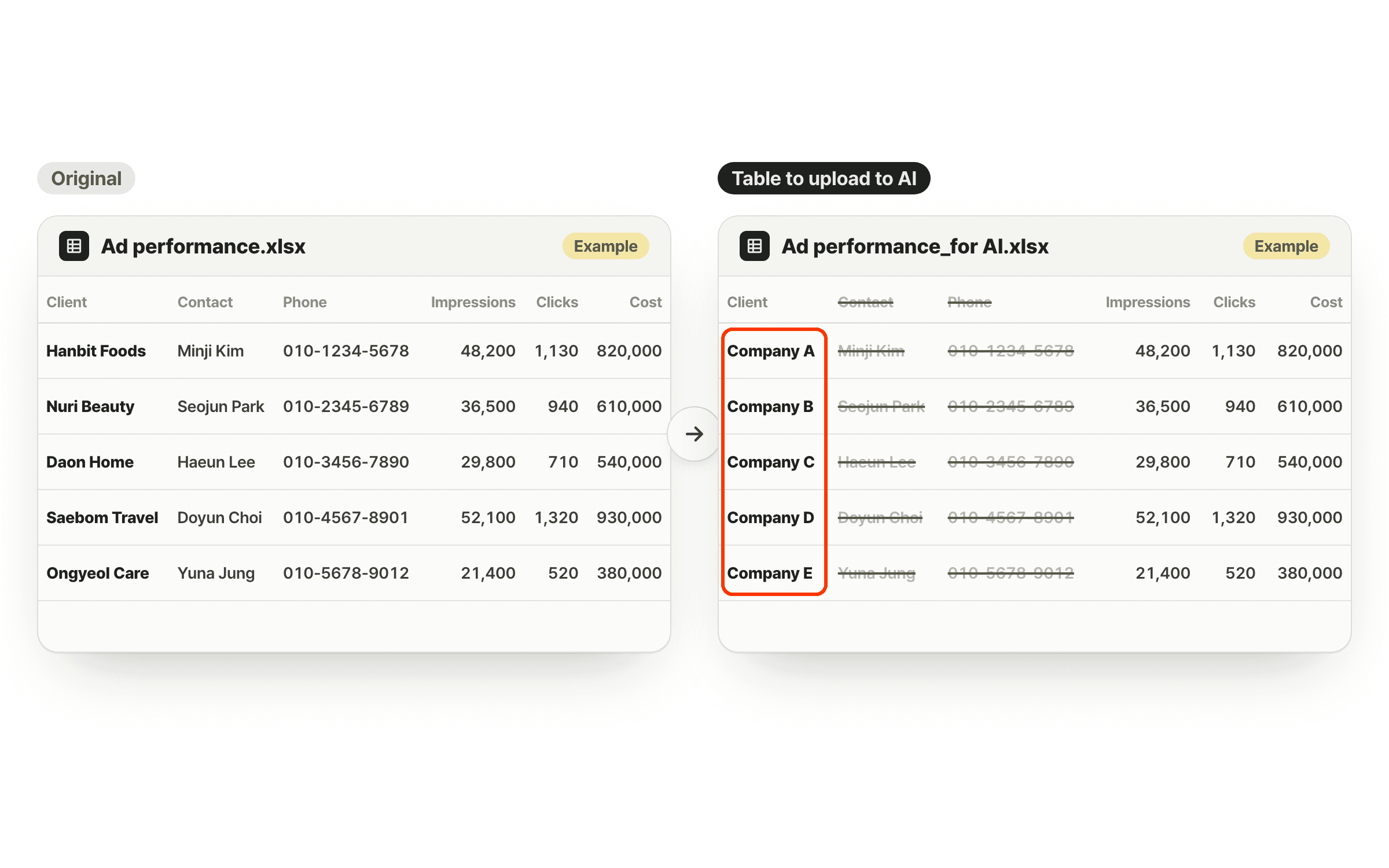
What AI needs to analyze ad performance is numbers like impressions, clicks and cost. Even without client names or contact details, it seems the analysis results would hardly change. And an Excel file with the names removed is hard to trace to a particular company's performance even if it stays on the server. So I think the few minutes it takes to remove names and contact details before uploading are well spent.
Today, you could start by opening the settings screen of the AI account you use now and checking the training setting. Then find out whether your company has rules on AI use, and each time you're about to put data in, ask yourself whether it's public data, internal data to put in with the names removed, or data to leave out.
Even if you pay, on a personal plan you have to check the training setting yourself. As of November 2026, ChatGPT has training turned on from the start on Free, Plus and Pro alike, and Claude follows the setting you chose at sign-up on Free, Pro and Max alike. The plans that don't use data for training by default are business plans such as ChatGPT Business and Enterprise and Claude Team and Enterprise.
Even with training off, conversations where you clicked thumbs up or thumbs down may be used for training or kept longer. As of November 2026, ChatGPT says that if you click thumbs up or thumbs down, the whole conversation may be used for training even with training off, and Claude keeps such conversations for up to 5 years. Gemini keeps conversations for 72 hours when [Keep Activity] is off, but conversations you sent feedback on are an exception to that limit and stay even after 72 hours.
Some of the conversations deleted in ChatGPT between April and September 2025 may still be there. OpenAI said its preservation obligation under the court order in The New York Times lawsuit ended on September 26, 2025. It also wrote, though, that it continues to keep some data from this period even after the obligation ended.
With a Claude work account, the company can see [Incognito chat] too. As of November 2026, on Claude Team and Enterprise, the data that organization owners download includes incognito chats. Even if a chat disappears from your chat list, it stays in the company's data export.
As of November 2026, the default auto-delete period for [Keep Activity] in Gemini is 18 months. If you haven't changed the period, conversations stay in your activity for a year and a half. For conversations where you put company data, it's best to delete them right away and not wait for auto-delete.

I am a growth marketer who consults on growth marketing and AI adoption.