Contents 5
"Summarize last month's ad performance"
Ask AI like this, and the answer usually comes back in a few seconds, complete with a table by channel and a summary. But when you try to take it to a team meeting as is, you find yourself thinking, "Why are there so many metrics, and where's the conclusion?" and it takes quite a bit of work to trim the table and reorder things. That's because what AI produces is like a mirror that reflects your request, so context that isn't in the request can't be in the output either. (Related post - How to Work in the Age of AI: The Bar for Good Work)
What should we do, then? To work with AI, we need to learn how to communicate with it about work. In this post I'll use made-up ad data to go through how the answer changes depending on what you add to the request, and what to say when you ask the AI to fix its first result. I've also drawn on the official guidance from OpenAI, Anthropic and Google (as of November 2026).
Imagine AI as a colleague who joined yesterday#
Let's say you asked a colleague who joined yesterday to summarize last month's ad performance. I think a colleague who is good at their work wouldn't open Excel first and would start by asking what it's for.
- What is this for?
- Who's going to read it?
- Which month should I compare it with, and which metrics should I focus on?
- What format would you like it in?
AI isn't a person, so when it gets the same request it usually doesn't ask questions back like this. For the parts it doesn't know, it just assumes the most generic answer and produces a result right away. It would rather answer fast than ask.
If you say, "Summarize last month's performance data for ad channel X," the AI really does make a table right away. It even decides on its own which month "last month" means, based on today's date, and pulls the numbers right away. In a case like this its guess is usually right, but if it had pulled data for a different period or basis than the one you had in mind, you would have had to do the whole task over from the start. When that happens right before a meeting, the table you got quickly ends up eating more of your time.
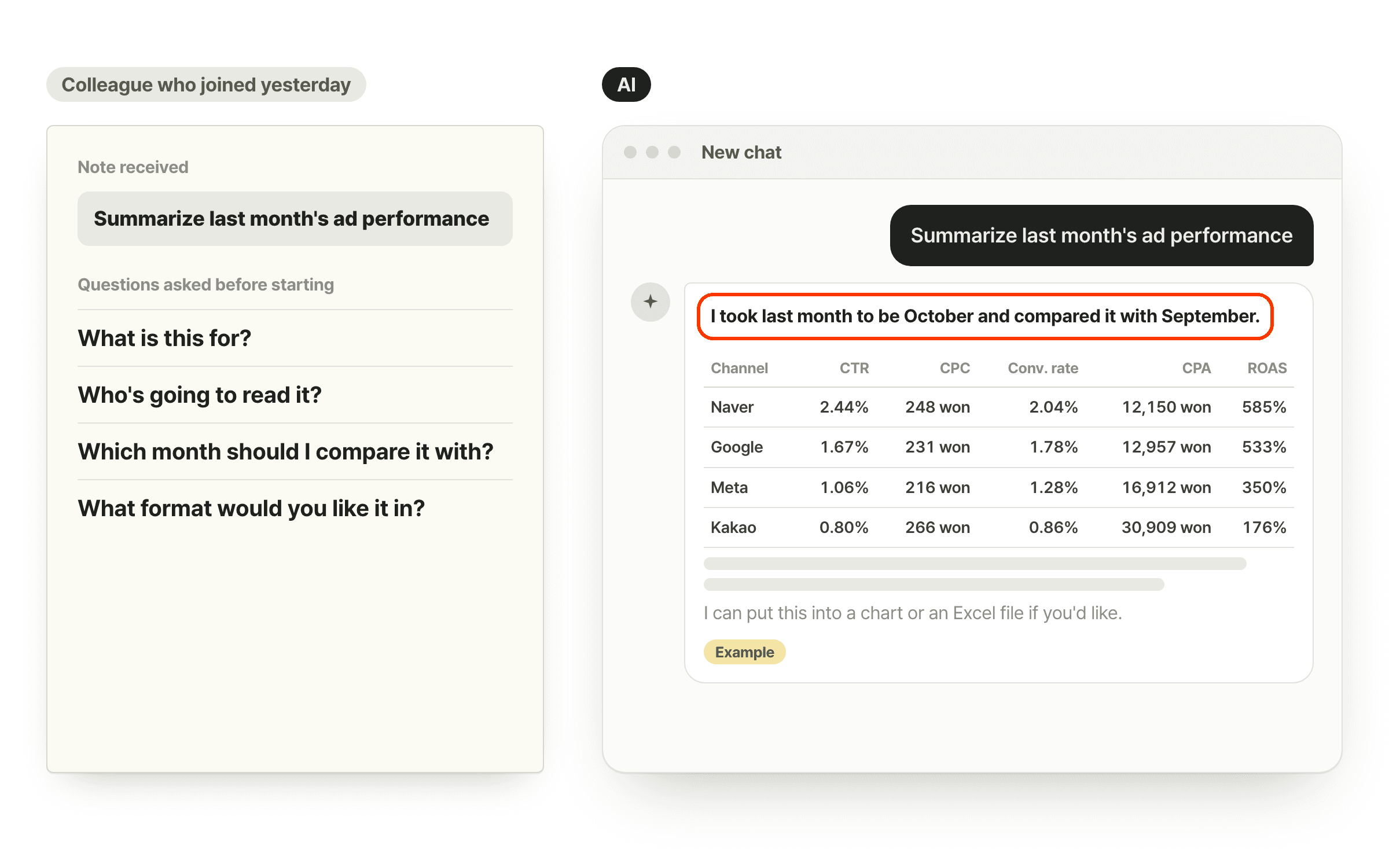
Even when the analysis period is fine, the output can fall short in other ways. Taking the example above, the numbers are certainly all correct, and every metric in the data is there, from click-through rate to ROAS (return on ad spend, meaning revenue relative to ad cost). At a glance it looks good.
But if you walk into the meeting with the table the AI made, you can't answer the question, "So what are we doing with next month's budget?" The AI was never told this was for a budget meeting, so from its side, including a bit of everything in the data was the best it could do.
What should you include when you ask AI to do a work task?#
If you make a request with no background, AI will never give you a satisfying result. It rarely understands after a single explanation, either. AI is fast, meticulous and relatively accurate, but it can't read the room and doesn't pick up on context. Depending on the situation, these traits can be a big source of stress when you work with AI. Still, I think this difficulty can be reduced, even if it can't be removed completely. To start with, when you ask AI to do some work, you can answer in advance the questions a colleague who joined yesterday would have asked. Anthropic's developer guidance also recommends thinking of AI as "a brilliant but new employee who lacks context on your norms and workflows." You write that context down first, in the request text we commonly call a prompt.
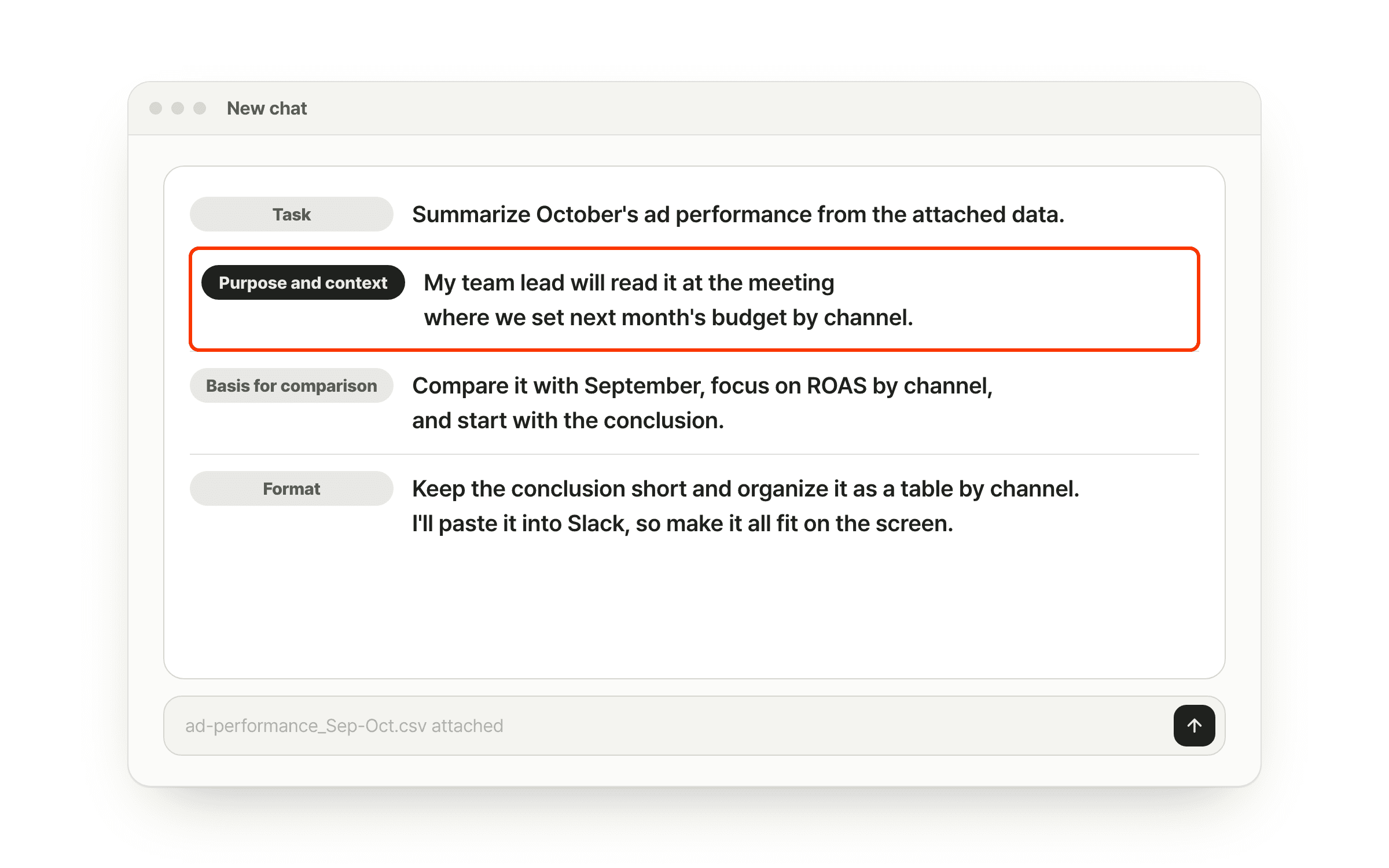
For the request about last month's ad performance, the answers to that colleague's questions would look like this.
- What is this for? → "It's for the meeting where we set next month's budget by channel."
- Who's going to read it? → "My team lead will read it."
- Which month should I compare it with, and which metrics should I focus on? → "Compare it with September, focus on ROAS by channel, and start with the conclusion."
- What format would you like it in? → "Keep the conclusion short, organize it as a table by channel, and make it all fit on a Slack screen."
If you divide your answers to the colleague's questions into purpose and context, basis for comparison, and format, and give each a name, it's easy to take them out of the request or add them one at a time. Add the task ("Summarize October's ad performance") and the request is complete.
So does the answer really change if you write down what it's for, the basis for comparison and the format? I tried it with made-up ad data, adding one thing at a time to the request.
| What I added to the request | What changed in AI's answer |
|---|---|
| No extra explanation | AI made its own call on everything left vague and went ahead A table with every metric and suggestions that could apply anywhere |
| Purpose and context ("It's for the budget meeting," "My team lead will be looking at it too") | The results that fit the purpose were placed at the top as a summary More specific suggestions that fit the intent |
| Basis for comparison (against September, focusing on ROAS, and so on) | The conclusion was interpreted against the basis for comparison and the target metric |
| Format (short conclusion, table by channel, fitting the screen, and so on) | The conclusion got shorter and the table kept only the comparison by channel The budget adjustment was laid out as amounts by channel |
As in this example, the more information you fill in, the more specific AI's work can be. If you tell it this is for a budget meeting, the AI can propose a budget by channel instead of suggestions that could apply anywhere, and if you give it a specific purpose and a reference metric, it can read all the results in that light.
Do you have to spell everything out in the prompt every time?#
Writing a good prompt every time is harder than it sounds, and I don't think you need to fill in everything every time. Divided up like this, from task to format, a request looks like a formula you have to memorize, but the guidance from the companies that make AI is a little different.
Here is a table of how OpenAI, Anthropic and Google guide people on writing requests.
| Company | What they recommend | What they say is not essential |
|---|---|---|
| OpenAI | Make the task clear, give the context it needs and set the tone Refine as you look at the first answer | Perfect wording (natural language that shows the purpose is enough) |
| Anthropic | Write clearly and specifically Give the reason for an instruction, and examples | Heavy role assignment (mostly unnecessary with recent models) |
| Write the persona, task, context and format in natural language Keep refining as if in a conversation | Using every element |
If you've been opening every request to AI with something like "You are a marketer with 10 years of experience," the AI companies' guidance may come as a bit of a surprise. Google says to write a persona, while Anthropic sees it as mostly unnecessary with recent models. Google is the one that says outright that you don't need to use every element of a request, but OpenAI also says that natural language that shows the purpose will do, rather than perfect wording.
The basic guidelines for communicating with AI differ from company to company, but if there's one thing they have in common, it's that it's better to tell AI the purpose, even briefly. I'll say it again: AI really can't read the room, so when it works without knowing the purpose, it very easily produces meaningless output.
Then what about the things other than the purpose, like the reader, the basis for comparison and the format? What's tedious to write in every request is really the content that hardly ever changes, like the reader or the format. If you write it once in the project instructions in ChatGPT and Claude, or in a Gem's instructions in Gemini, you don't have to write it again in the chats you open there. In the request itself you only need to write what changes every time, like the month to compare.
When you get the first result, say what's not right and why#
One more thing. This is only my personal view, but I tend to tell people that it's better not to expect a satisfying result from a single request at all. That's because AI is not that smart yet (fortunately). You need at least two or three rounds of back-and-forth before you can get the result you want. That can also be what separates people who use AI well from people who don't. If the first result isn't what you expected, I'd recommend explaining to the AI specifically what's not right and why, before you feel let down. It takes some of the pressure off if you think of giving feedback as part of the first request from the start. That seems to be why OpenAI and Google also tell you to keep refining after you get AI's first answer.
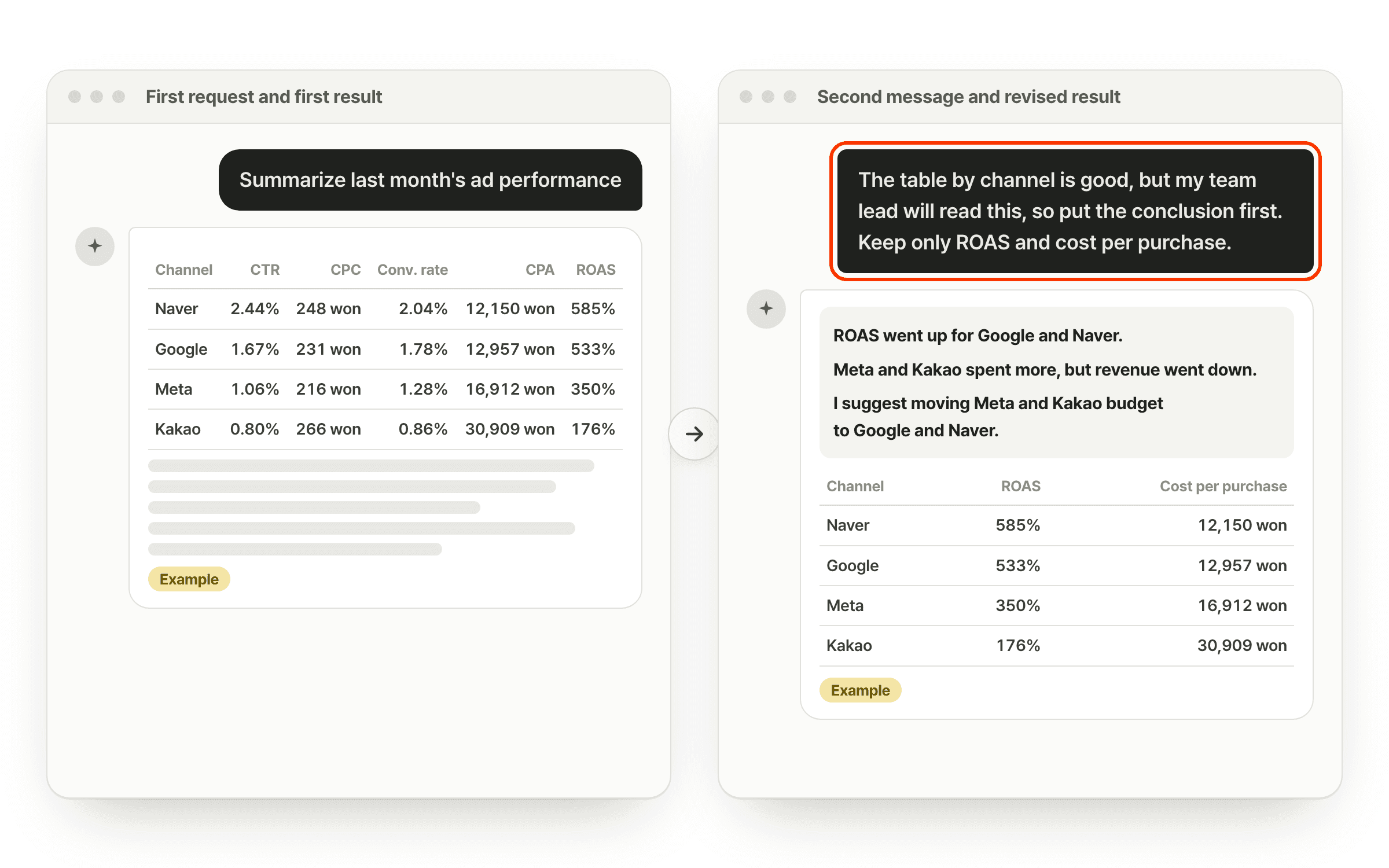
Let's compare what you could send when asking AI to fix its first result.
- "Do it again."
- "The table by channel is good, but the budget suggestion has nothing to back it up. For each channel, also write how much ROAS changed from September."
When all the AI gets is "Do it again," it can't tell whether the problem was the table by channel or the budget suggestion, so once again it picks what to fix on its own. It's just like when it filled in the period and the metrics by guessing on the first request. When the exchange goes like this, the back-and-forth rarely seems to end in two or three rounds. If you say what to keep and what to change, along with the reason, there's far less left for the AI to choose on its own. Here too, it helps to say to the AI exactly what you would say to a human colleague. You wouldn't just say "Do it over" about the first draft a colleague brought you.
Wrapping up#
What AI produces also works in reverse. It shows what was missing from my request. When I write down why I'm asking for a fix, those reasons seem to be mostly things that were missing from the first request. I put what I learn into the next prompt, then apply what I learn from that to the one after. If we communicate like that, won't we naturally get more out of AI?
Not necessarily. OpenAI's guidance is to match the size of the prompt to the task and to write the important things first. When the task is big, it is sometimes better to split it into several small requests than to send one long one, and when the task has several things to check before going ahead, it is sometimes better to give plenty of context. In the end, I think each of us has to find the right amount of detail as we communicate with AI.
I recommend including something you made before, or an example of the shape you want, in the prompt. Both OpenAI and Anthropic say that showing the result you want as a reference helps AI do the work. Attaching one page of last month's report is often faster than explaining at length in words.
It seems fine to start with the same request. The guidance from OpenAI, Anthropic and Google points in nearly the same direction, which is to write the task clearly, give context, and refine as you look at the result. The shape of the answer can differ from service to service, though, so you need to look at the first result and ask for fixes whichever service you use.
This one matters a lot. First, I recommend writing in the request that AI may say it doesn't know when it doesn't know. Anthropic also advises giving AI permission to say so when it isn't sure. If the numbers matter for the task, it's a good idea to be specific, like "Don't estimate numbers that aren't in the data, and write that they are missing."

I am a growth marketer who consults on growth marketing and AI adoption.