Contents 5
In Anthropic's Claude and OpenAI's Codex, the model menu has a second setting next to the model name: the reasoning level, which controls how long the AI thinks. Picking the smartest model at the highest level seems like it would get you the best answers.
But when you actually try that, the answer sometimes doesn't look much different from what you got with your usual settings. You wait longer and use up your plan faster. Should you change the model then, or raise the reasoning level? And if you've already picked the highest level, there's nowhere higher to go.
I think this question is hard to answer if you lump the model and the reasoning level together as one thing called performance. The model decides which AI does the work, and the reasoning level decides how long that AI thinks before it answers. In this post I'll put the models and reasoning levels of Claude and Codex into tables, based on the official guidance as of November 2026. Then I'll lay out an order for choosing both. It will help you tell whether a disappointing answer calls for a smarter model, more time for the same model, or a better request.
What is the difference between an AI model and its reasoning level (effort)?#
The model and the reasoning level sit side by side in the menu, so they look like one set, but you choose them separately. Here is what each one does.
- Model: Models differ in the level of work they can handle, their speed and how much usage they take.
- Reasoning level (effort, reasoning effort): It sets how long the same model thinks and checks before it answers. The higher you set it, the more thorough the answer gets, but it takes longer to arrive and uses more of your plan.
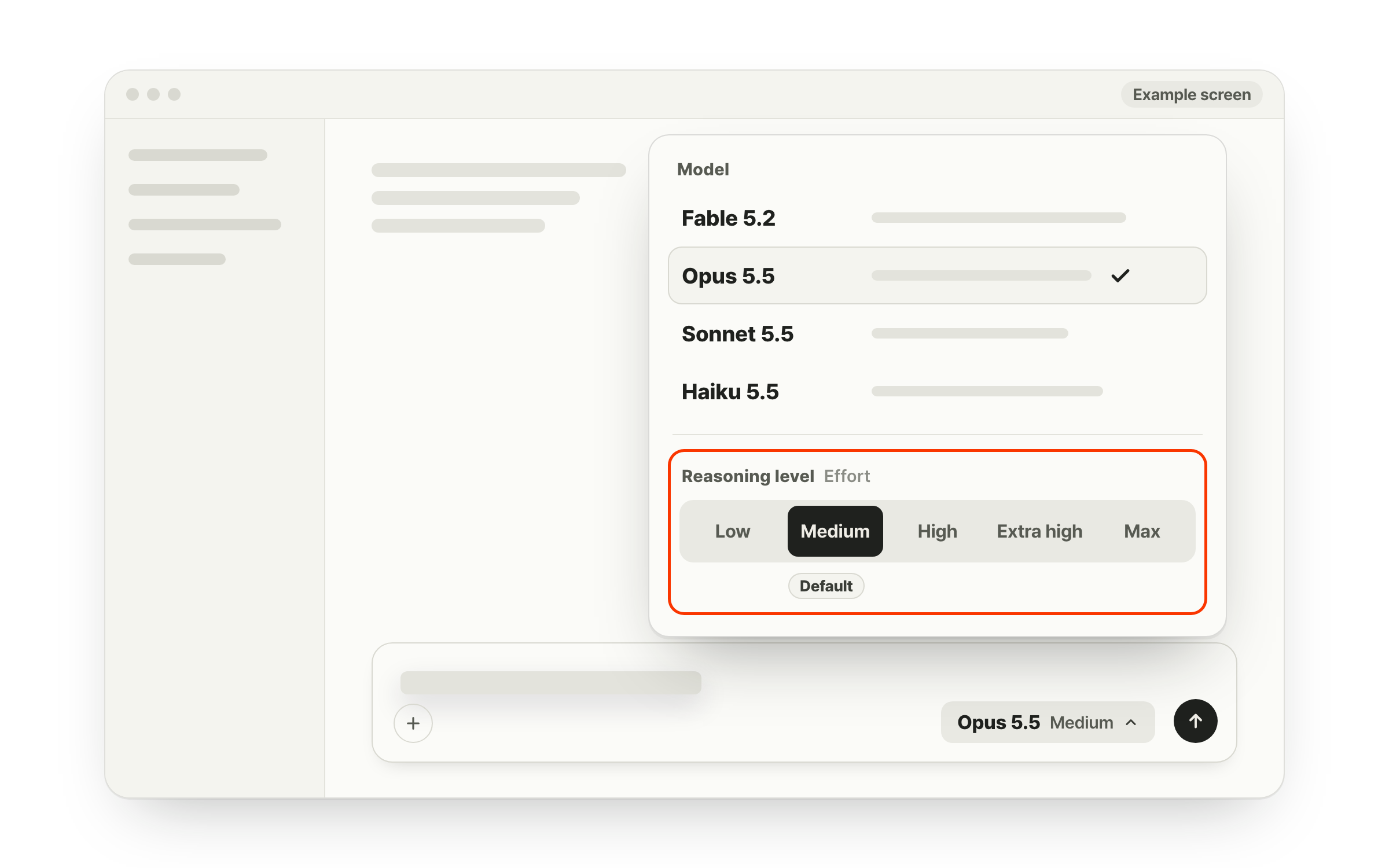
Choosing a model and a reasoning level is a lot like asking a person to do some work. If the model is "Who should I give this to?" the reasoning level is "How much time should I give that person?" Changing the model changes who does the work. Raising the reasoning level gives the same person longer to think it over. Of course, if the request doesn't say what you want done, it's hard to get the answer you want no matter who you ask or how much time you give them.
What actually changes when you give the AI more time? Anthropic says that when it tested Opus 5.5 (released in September 2026) and the earlier Fable 5.1, the models looked at more cases and checked their own results more often at higher levels. At lower levels, a first draft to work from came out faster. If you'll look at the result right away and ask again, there's no reason to wait long. If the AI will work on its own for a long time, it seems better to give it plenty of time.
When an answer isn't good enough, what should you change first? I'd start by keeping the same model and raising only the reasoning level. That changes just one thing: time. Switching models changes ability, speed and usage all at once, so even if the answer improves, you can't tell why. Anthropic also explains that adjusting the reasoning level is often better than switching models.
If you pick the highest level from the start, you have nowhere to go when an answer isn't good enough. I recommend beginning at the starting level that Anthropic and OpenAI each give instead. The starting level and the menu for changing it differ by service, so let's look at Claude and then Codex.
Claude's models and reasoning levels (as of November 2026)#
Claude uses the same models in the Claude app (claude.ai and the desktop and mobile apps) and in Claude Code, and you choose the reasoning level from the same steps, low through max (I covered the difference between the app and the terminal in Browser, App or Terminal: Where to Use ChatGPT and Claude). That means whether you use Claude in the app or in the terminal, the one table below is all you need for the models.
| Model | Characteristics | Recommended work | Default reasoning level in Claude Code |
|---|---|---|---|
| Claude Fable 5.2 | The smartest of the models Anthropic has released for anyone to use | Work that runs for hours, deep multi-step research, analysis that carries through to a finished document, table or slide deck | medium |
| Claude Opus 5.5 | A model for long-running complex work and knowledge work. The model Anthropic recommends first for most work | Long coding tasks, large-scale edits, image-heavy work | medium |
| Claude Sonnet 5.5 | A model that balances speed and ability | Everyday coding, data analysis, content creation | medium |
| Claude Haiku 5.5 | The fastest and lowest-priced model | Work that needs real-time answers, high-volume processing, subtasks | medium |
The default reasoning level in the right-hand column looks a little unexpected. You'd think a smart model would start high, but even Fable 5.2, the smartest one, starts at medium in Claude Code. Anthropic explains that it tunes the reasoning levels separately for each model. In other words, the same medium means a different amount of thinking on each model, and this difference shows up more clearly in the Codex table.
In Claude Code, the default in the model table is the starting level. In the app menu, the recommended level for each model is marked [Default]. Start there and go up one step at a time when an answer isn't good enough.
How far to go up depends on the work. I think the table below is more useful for seeing where to stop than for deciding where to start.
| Reasoning level (app label) | Recommended work |
|---|---|
| low (Low) | Fast back-and-forth work where you check results one at a time. Coming up with ideas, first sketches, small edits |
| medium (Medium) | Everyday work with a clear scope. When you want to save usage on repetitive tasks |
| high (High) | The level with the best balance of quality and speed. Work where checking matters or where there are likely to be many exceptions |
| xhigh (Extra high) | Long coding and agent work. Thinks more deeply than high without taking as much usage as max |
| max (Max) | Hard problems that need the deepest reasoning. The thinking can get longer while the benefit shrinks, so Anthropic advises trying it first and then deciding |
Where you change the level differs between the app and Claude Code.
- Claude app: Click the model name next to the send button to select a model, and select the level under [Effort]. You can change both at any point in a conversation, and the new setting applies from the next answer.
- Claude Code: Select a model with
/modeland adjust the reasoning level along with it using the left and right arrow keys, or change only the reasoning level with/effort.
Besides [Effort], the app menu has a separate [Thinking] setting that turns thinking on. Turning it off seems like it would make answers faster, but none of the models in the table above let you turn it off. Even when you want to cut the time the AI spends thinking, [Effort] is the setting to change.
Codex's models and reasoning levels (as of November 2026)#
You can use Codex in the ChatGPT desktop app and in the Codex CLI. The two are quite different, starting with where you select the model and the reasoning level.
- ChatGPT desktop app: Select the model and the reasoning level on the slider (Power) below the input box. Move the slider toward [Smarter] and Codex thinks more deeply, and move it toward [Faster] and Codex answers faster and takes less usage.
- Codex CLI: Select both with
/modelduring a session. Max and Ultra appear under [More reasoning…] after you pick a model.
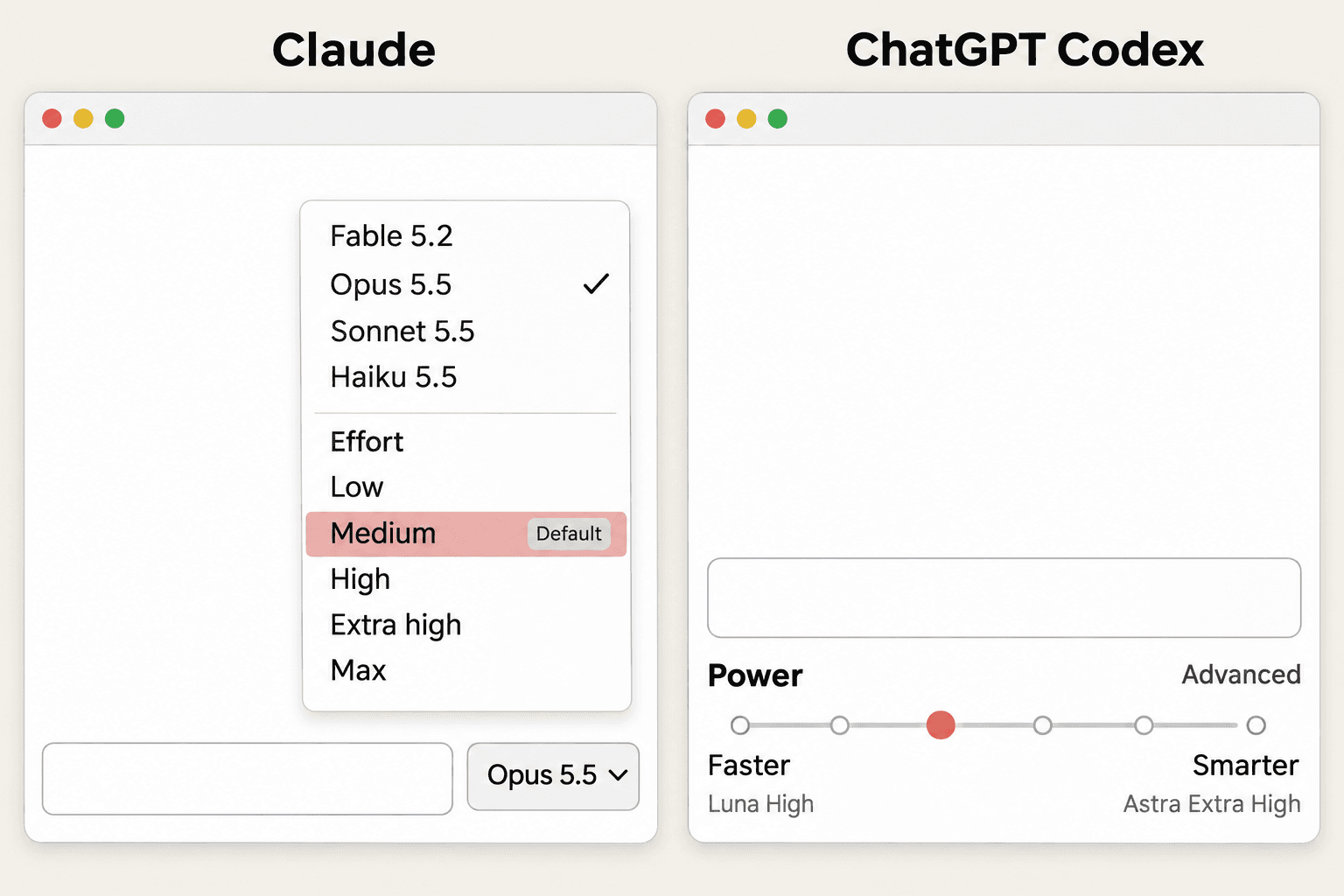
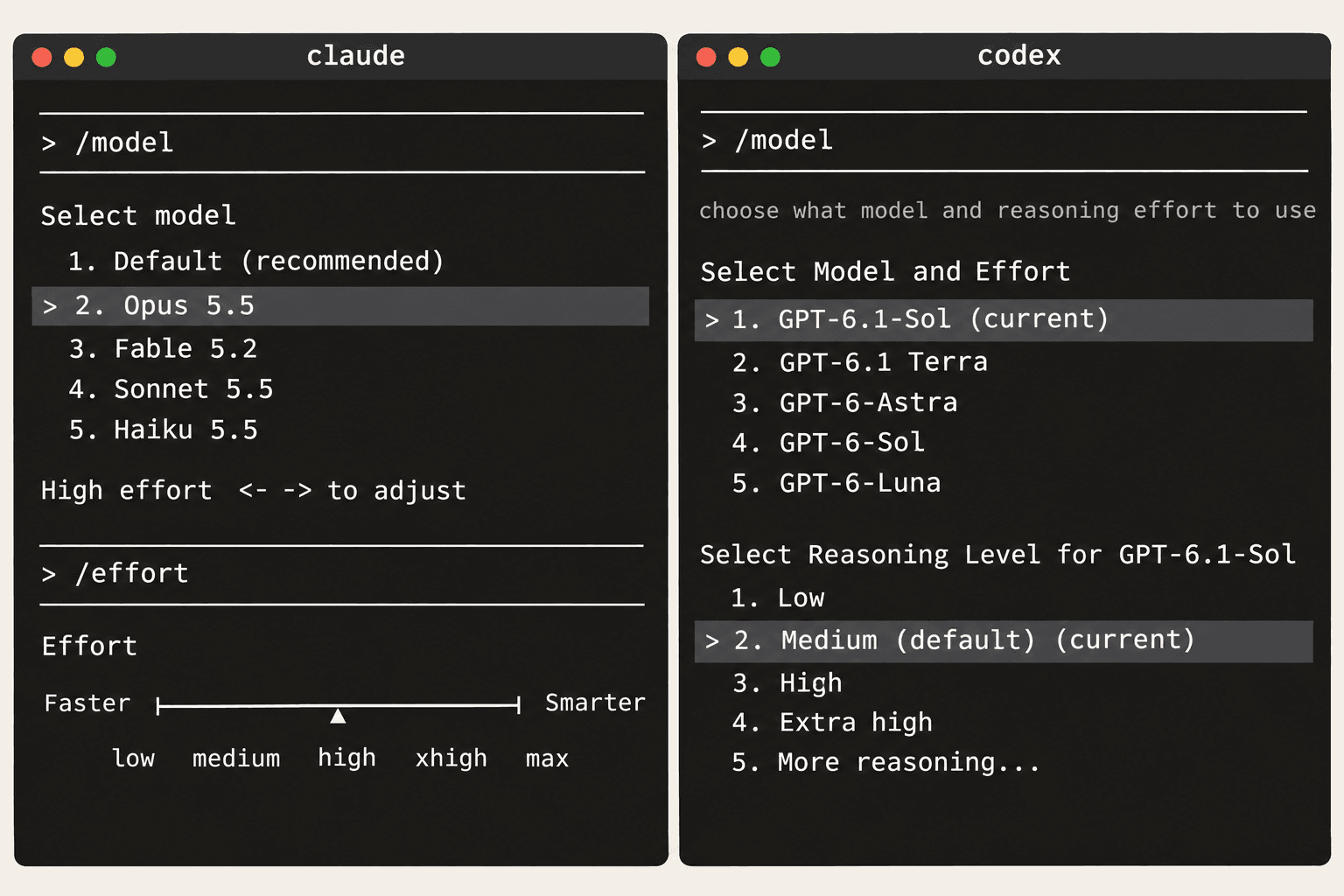
The Power slider in the ChatGPT app is convenient because you can decide in one move whether Codex answers faster or thinks more deeply. But each step on the slider ties a model and a reasoning level together, so moving it just one step changes both at once. The steps OpenAI gives as examples also pair a model name with a level, like Luna High or Astra Extra High. The steps on the Power slider can differ depending on your plan, the screen you're on and your company account settings.
If the answer got better after you moved the Power slider, you're left with a question: "Was it because the model changed, or because it thought longer?" You can't tell from the Power slider alone. If you want to change one thing at a time, open [Advanced] next to the slider and select the model and the level separately.
If you choose them separately, which level should you start at? Here are the starting levels OpenAI recommends for each model.
| Model | Characteristics | Recommended work | OpenAI's recommended starting level |
|---|---|---|---|
| GPT-6 Astra | OpenAI's smartest model. Strong at deep reasoning and computer use, with good judgment | The hardest work that moves between code, apps and research | Light (low in the CLI) |
| GPT-6.1 Sol | A model that performs close to Astra at a lower cost | Repetitive, long-running work that moves between code, apps and documents | The default of the screen you're using |
| GPT-6.1 Terra | A fast and efficient model | Clear writing, reading charts and screens, work done inside apps | No specific guidance |
| GPT-6 Luna | The most efficient model | High-volume work where it's clear what a good result is, like summarizing, extracting and classifying | High |
What stands out in the Codex model table is the starting level. OpenAI says to start Astra, the smartest model, at Light, the lowest level, and to start Luna, the most efficient model, at High. You'd expect a smarter model to start higher, so it looks like they wrote it backwards.
OpenAI hasn't said why Astra starts at Light, the lowest level. The reason is probably the one in Anthropic's explanation above: a level with the same name means a different amount of thinking on each model. I suspect a smart model like Astra thinks enough even at Light, while an efficient model like Luna needs something like High to think that much. From the name of the level alone, it's hard to judge whether there is enough time to think.
The table below shows the work OpenAI recommends for each reasoning level. As with Claude's table, you can use this one to see where to stop as you go up from the starting level.
| Reasoning level (app / CLI) | Recommended work |
|---|---|
| Light / low | Fast work with a clear scope |
| Medium / medium | Work that needs a bit more planning. A balance of speed and depth |
| High, Extra High / high, xhigh | Hard work that goes through several steps and sources and has many conditions to consider |
| Max / max | When you want it to think longer about the one hardest problem. When depth matters more than speed and usage |
| Ultra / ultra | When you want a big job split among several subagents and handled at the same time. Not available for GPT-6 Luna |
Going by its name, Ultra, at the bottom of the table, sounds like a level that thinks even longer than Max, but it's a different kind of thing. To go back to the earlier comparison with asking a person, Ultra is about splitting the work among several people rather than giving one person more time.
You only need Ultra when the work can be split into several pieces and done at the same time.
With this many models, which model and level should you select for the work you're about to do?
Should you always use the smartest model? How to choose an AI model and reasoning level for the work#
I think you can choose the model by the type of work and adjust the reasoning level as you look at the answers.
If you had to wait for the smartest model's answer and spend usage on it just to polish a few lines of a report you write every week, wouldn't that be a bit of a waste? The smartest model is a model built for the hardest and longest work, after all. For work you do every day, a faster model that takes less usage is often enough.
When you choose a model, I'd suggest looking first at how hard and how long the work is, before the model name. Claude's and Codex's models have different names, which makes them hard to compare. But going by how Anthropic and OpenAI describe what each model is for, they seem to divide up the work in fairly similar ways. Anthropic and OpenAI have not said that their models are in the same class as each other's, and this is my own comparison based on those descriptions, so please treat it only as a rough guide.
| Type of work | Claude model | Codex model |
|---|---|---|
| The hardest and longest work | Fable 5.2 | GPT-6 Astra |
| Complex work that takes time | Opus 5.5 | GPT-6.1 Sol |
| Everyday work, done fast | Sonnet 5.5 | GPT-6.1 Terra |
| High-volume repetitive work | Haiku 5.5 | GPT-6 Luna |
And what about the reasoning level? Starting at the highest level seems like it would put your mind at ease. It takes longer, but a better answer should come out. That isn't necessarily so. At the highest level, the benefit itself can shrink.
OpenAI says most work doesn't need Max or Ultra. Anthropic also explains that at max the thinking can get longer while the benefit shrinks. This is probably why you sometimes get a similar answer while only the time and usage go up. If you're already using the highest level, it's worth dropping to the starting level and giving it the same work again. If the two answers are similar, you were only spending more time and usage.
That doesn't mean you should stay at the starting level for all work. Whether to go higher seems to come down to asking, "Is this something I'll look at right away and fix, or something AI has to think about by itself for a good while?" Going by OpenAI's examples, a low level is enough for rewriting a short email, and comparing several proposals with conflicting conditions is worth a high one. You'll look at the email right away and fix it again, while the AI has to think about the proposal comparison on its own for a long time. For work where AI runs on its own for a long time, both Anthropic and OpenAI recommend Extra high. For GPT-6.1 Terra, where OpenAI gives no specific starting level, you can start at whatever level the screen is set to at first.
The hardest moment to decide is when you've started that way, gone up a level, and the answer still isn't good enough. If it got more thorough after one step up, you can say that what was missing was time to think. But if it stays the same after several steps, the problem may not be a lack of time to think. It's the same when you ask a person to do some work. If what you want done is missing from the request, you won't get the result you want however much time you give them. So I recommend looking at your request again before changing the model. If you've raised the level enough, your request is clear and the answer still isn't good enough, that is when you need a smarter model.
If you've changed the model, I recommend going back to the new model's starting level instead of keeping the level you were using. High on the old model doesn't mean the same amount of thinking as High on the new one. OpenAI also explains that levels with the same name are not identical across model generations.
Sometimes the model has changed even though you never touched the menu. GPT-5.5, which was used in Codex, stopped being available with a ChatGPT account on October 14, 2026, and depending on your plan you now use GPT-6.1 Sol or GPT-6 Luna. In Claude Code too, if you had Fable 5.1 selected on the Pro or Max plan, it was switched to 5.2 when Fable 5.2 came out. If the model name in the menu has changed, you can start again from that model's starting level.
After going back to the starting level, you can quickly settle how far to raise it by comparing results. Pick work you do often, like a report you make every week, and run it a few times changing only the reasoning level. The level that fits that work will start to show. Anthropic and OpenAI also advise testing with work you know well and with real material.
How to choose an AI model and reasoning level, step by step#
Here is the order, from looking at the type of work to changing the model.
- Choose the model by the type of work. Use the type of work table as your guide, though the models you can use may differ by plan.
- Begin at the starting reasoning level. For Claude, use the level marked [Default] in the app or the Claude Code default as is. For Codex, use the starting level in the Codex model table. For a model with no starting level, leave it at whatever the screen is set to at first. For work where you'll see the result right away and fix it, the starting level or a lower one is enough, and for work AI has to think about by itself for a long time, starting at Extra high is worth a try.
- If the result isn't good enough, raise the level one step at a time. Once the answer is thorough enough, stop there.
- If the answer stays the same after several steps up, look at your request again first, and change the model only if the answer still isn't good enough. If you've changed the model, go back to the new model's starting level instead of keeping the level you were using.
- For work you do often, run the same task changing only the reasoning level, compare the results, and settle on the level that fits.
Raising the reasoning level can help reduce made-up answers, but it is hard to say they go away completely. The higher the level, the more often the model checks its own results, but a person still has to check against the source whether numbers and facts are right.
I think even a smart model can't fill in information that isn't in the request on its own. The model and the reasoning level only change how well it does the work it receives, and AI can only know what you want if you write it in the request.
No. In the Claude app you can change the model and the reasoning level at any point in a conversation, and the new setting applies from the next answer. In the Codex CLI too, you can change both with /model during a session.
For work where AI runs on its own for a long time, it's worth starting at a reasoning level higher than the default. Anthropic recommends Extra high (xhigh) for long coding and agent work. OpenAI also recommends Extra High for agent work that takes a long time and involves a lot to think through.
There is no fixed amount of usage for each level. Anthropic explains that the reasoning level is a signal that tells the model how much effort to put in, rather than an exact usage limit. The most accurate way to find out is to run work you do often a few times, changing only the reasoning level, and compare how much the usage goes up.
The models you can choose differ by plan. As of November 2026, Codex uses GPT-6 Luna on the Free and Go plans, and GPT-6.1 Sol is available on Plus and above. Claude Code is available on the Claude Pro plan and above, and if you choose Fable in Claude Code, it may be billed as extra usage (usage credits) depending on your plan.

I am a growth marketer who consults on growth marketing and AI adoption.