Contents 3
When you ask AI to do some work, where do you usually do it? Most likely in the chat window of ChatGPT or Claude. Chat is, as the name says, a place for conversation, so it works by you asking and AI answering. If the job is summarizing one set of meeting notes or polishing one email, this back-and-forth is enough.
But if you have to do the same work many times, like a newsletter that goes out every month, things are different. I've written before that when a conversation gets long, AI tends to lose track of the rules set earlier, so it's better to write up a long conversation and move it to a new chat. After moving to a new chat a few times that way, you start to wonder, "Should I really keep doing this work in chat?"

Today I'd like to go through what limits you run into when you do recurring work in chat, and what changes when you move that work to a project. The features and menus are based on the ChatGPT and Claude help pages as of November 2026.
What are the limits of doing recurring work in AI chat?#
I think there are clear points where the answers go wrong when you do recurring work in a single chat. Suppose someone writes a newsletter draft every month in one chat window and also asks for emails to business partners there from time to time. Here are a few of the frustrations they'd likely run into. Each one looks minor on its own, but I think they get quite bothersome when they pile up month after month.
-
Every time they switch chats, they have to explain the newsletter again from the beginning. When the newsletter chat gets long and they open a new chat, the AI in the new chat starts out without knowing this newsletter's rules. So to get the draft they want, they have to write out again in the new chat who it goes to, what tone it's written in, how long it is and how the titles are written. That's when they think, "I said all this last month too…" After giving this explanation every month, they start to think, "Should I just keep going in the chat I was using?" and then the chat gets long again.
-
If they also ask for partner emails in the chat where they were writing the newsletter, the answers for the two jobs get mixed up. They ask in the newsletter chat for an email to send to a business partner, and AI writes the email in a newsletter tone, something like "We're by your side again this month…" It goes the other way too, and scheduling details discussed with the partner sometimes slip into the newsletter draft. Of the things that happen when you work in one chat, I personally feel this is the most troublesome. A mixed tone is hard to notice until you read the text over again.
-
Even if they only ask for the newsletter, as issues pile up, a request from a past issue comes back in the draft of a new issue. Say that while writing the second issue they said, "Put the year-end event notice at the top of this issue." It was a request needed only for that issue, but when they write the fifth issue, AI still starts by making a spot for the event notice. They end up starting by deleting that paragraph, thinking, "Why is this in here again?" A person would have understood that it was "only for last time."
How should you give recurring work to AI in chat?#
If you work in chat, I think it's important to keep one thing in mind. Chat is made for conversation, for asking and answering, and isn't a space dedicated to work. That's where the frustrations of explaining the same thing again and getting answers mixed up with other work come from.
When the AI in a chat window writes an answer, it reads the entire conversation in the current chat as context. For example, the messages where you set the newsletter's audience and tone, talked about the partner's schedule and asked for the event notice in the second issue are all part of the same conversation to the AI. When you open a new chat, the conversation where the rules were set isn't in that chat, so the AI in the new chat has to hear the rules again from the beginning. If you ask for a partner email in the chat where you were writing the newsletter, the AI in that chat reads the earlier newsletter conversation as context for the email too. When the second issue's event notice comes back in the fifth issue, from the AI's point of view it's just following, once more, a request it received in the same conversation. It's simply following everything it was told.
In a conversation, it's natural to carry over everything that was said earlier. Even when you talk with a friend, it only works as a conversation if you remember what was said before and continue from it. But work is different. With a newsletter, you need to keep the rules to follow every month apart from the requests needed only for this issue, and details from other work shouldn't be pulled in. Chat has no separate place to keep rules and requests apart. If you work in chat, you have to divide up the conversation the AI reads yourself. I recommend splitting chats by job, like this.
-
Split chats for each important piece of work. The newsletter goes in a newsletter chat and partner emails go in an email chat, and so on. If you keep each chat to the conversation of one job, a newsletter tone is far less likely to end up in an email answer than when you do both jobs in one chat. Even if the chat list gets a little longer, I think this is better than fixing the answers every time.
-
When a chat gets long, get a handoff note and move to a new chat that's only for that work. Before you move, ask in the chat you were using, "Write up the newsletter rules we've set so far and what to continue in the next issue as a handoff note for a new chat." Then paste that note in as the first message of the new chat. Since you carry over a note put together by the AI in the old chat, without writing the rules again from scratch, it's much less of a hassle. Reading the note also shows you what AI has taken as the rules so far, so it's worth reading it carefully at least once. At this point I recommend leaving out of the note any request that was needed only for one issue, like the year-end event notice asked for only in the second issue of the newsletter.
But even if you split chats by job and move with handoff notes, it isn't easy to divide context as much as you'd like inside chat. You'd think that since the chats are split the memory is split too, but it isn't. That's because the account's default memory is shared even across separate chats. ChatGPT draws on saved memories and past conversations, and Claude also uses memory built up from chats. You might open a new chat for partner emails and have the AI in that chat ask, "Should I add a greeting like in the last newsletter?" Of course, account memory helps at times. Still, for work you do every month, wouldn't it be better if memories of other work didn't get mixed in?
What is a project in ChatGPT or Claude, and how is it different from chat?#
A project in ChatGPT or Claude is a workspace made to suit recurring work, and it gathers the chats, instructions, files and memory used for one piece of work in one place. Even if you split chats and carry handoff notes over, memories from other chats get mixed in. That's why I think it's better to work in a project from the start.
You might think, "Do I have to learn yet another tool?" but using a project is exactly the same as using chat. In both ChatGPT and Claude, you create a new project from [Projects] in the left menu, then open a chat inside it and talk as usual. You can create projects on a free account too. Note, though, that as of November 2026 a ChatGPT free account can upload up to 5 files per project and a Claude free account can create up to 5 projects. I think this is enough to try moving one monthly job into a project.
Working in a project differs from chat in that the project holds the rules, files and memory for one piece of work separately. In chat, you had to look after these yourself by dividing up conversations. In a project, you just put each one in its place. For work you do every month, I feel this difference is quite big. The rules go in the instructions, the files go in the sources, and the memory is used only inside that project. With a project you can get around the limits of chat (the repeated explanations and the answers mixed up with other work) like this.
-
The newsletter explanation you gave in every new chat only needs to be written once in the project instructions. In the [Instructions] field of the project settings, you write who the newsletter goes to, what tone it's written in, and what the rules for length and titles are. Then even when you start the fifth issue in a new chat inside the project, I think you can expect the AI in that chat to follow those rules from the first answer when told, "Please draft this month's newsletter." And you spend that much less time wondering, each time you open a new chat, "Should I just keep going in the chat I was using?" Considering the effort of pasting in the same explanation every month, filling in one instructions field seems worth a try.
-
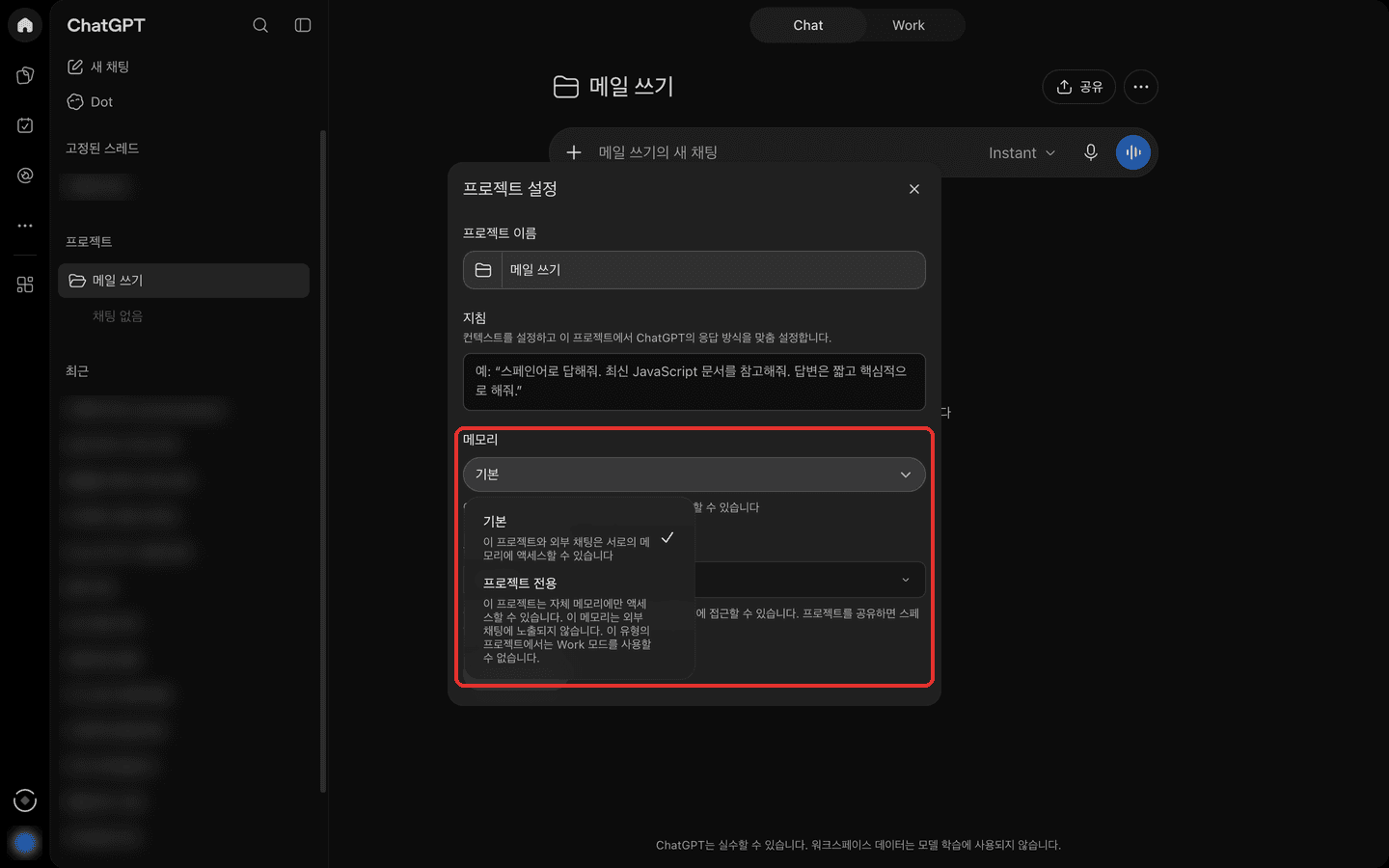
To keep a newsletter tone from getting mixed into partner emails, split the projects and set the memory to [Project-only]. You make a newsletter project and a partner email project separately. According to the ChatGPT help page, chats in a project set to project-only memory don't draw on saved memories and don't see conversations in other projects or regular chats either. According to the Claude help page, memory builds up separately for each project, and if you turn off the use of account memory under [Memory] on the project page, the project memory is completely separated from the account memory. Since this lets you divide memory that chats alone couldn't divide, I recommend looking at this memory setting first when you create a project for recurring work.
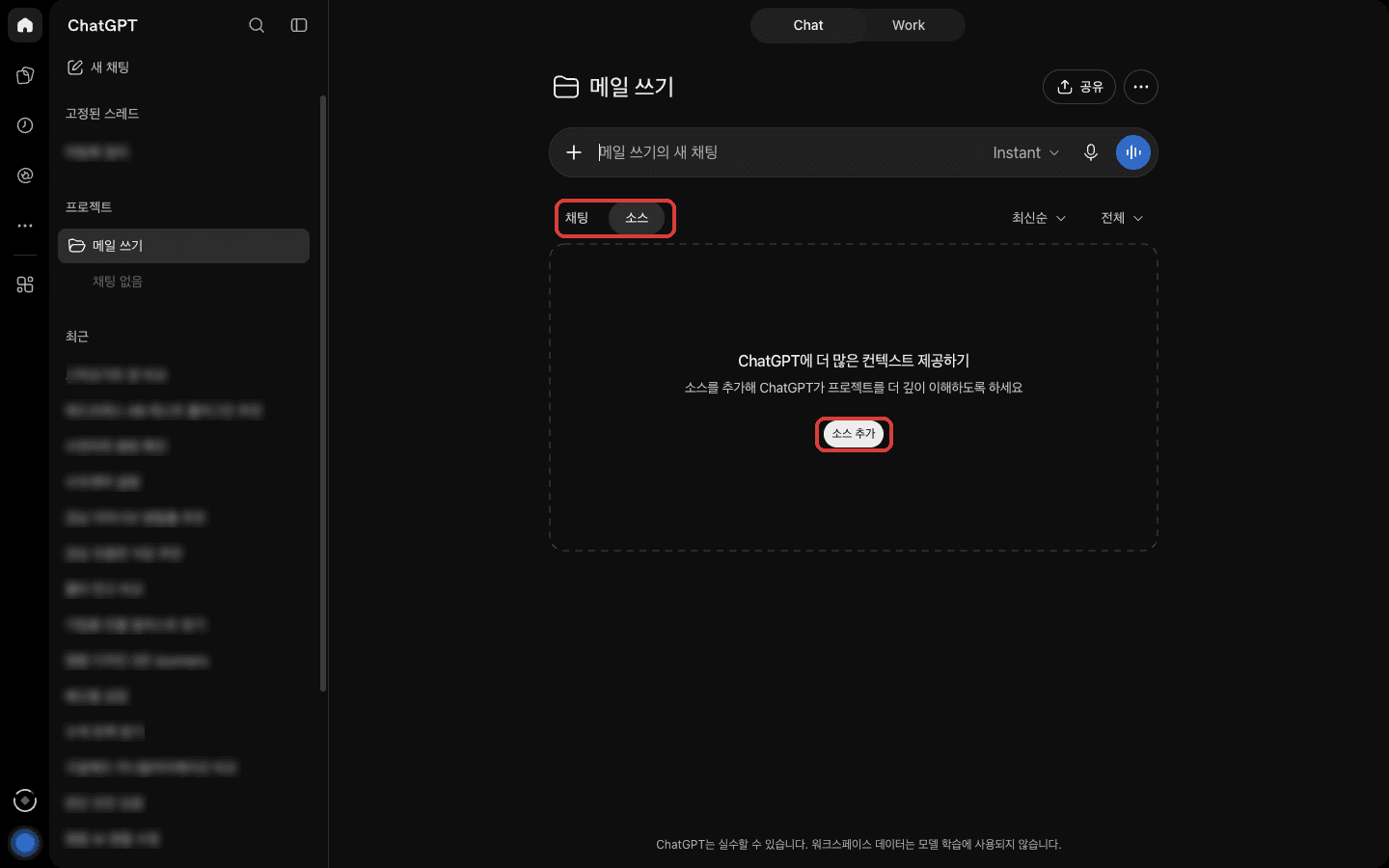
- Pasting a handoff note into every new chat becomes less necessary if you upload the previous issue of the newsletter as a project source. What ChatGPT calls project sources, Claude calls project knowledge. Once it's uploaded, the AI in a new chat also looks at the previous issue when it writes. You only have to write briefly, as the first message of the new chat, what to continue in this issue. Showing the previous issue directly also tends to get you a similar answer more easily than explaining it in words. I think it would be better to upload the last few issues together rather than only the previous one.
-
To keep the event notice that was meant only for the second issue from coming back in the fifth, write only the rules you'll always follow in the project instructions. Make the requests needed only for one issue in that issue's chat. Since the rules to follow every month and the requests needed just once are in different places from the start, I think past requests are less likely to harden into rules. However, according to the ChatGPT help page, chats within the same project can draw on each other's conversations, so it's hard to say this completely prevents past requests from coming back. Still, I think it beats writing in a single chat, where past requests tag along like rules every time.
-
Instructions, sources and memory apply as they are within the same project even when you switch chats, so you can just open a new chat for each newsletter issue. The rules and files carry over to the new chat, and requests needed only for that issue are made only in that issue's chat. Personally, this is the part I find most convenient about working in a project.
If it were me, I'd pick one job that comes around every month, create a project, set the memory to [Project-only], and then start this month's work in a new chat inside it.
The apps and websites of ChatGPT and Claude aren't the only places where you can work in projects. In the terminal, you gather the rules and files for the work in one folder on your computer and work inside it. The terminal is a black screen where only text goes back and forth, so at first it's harder to bring yourself to open than an app. But once you get a little used to it, I think you can actually work much more comfortably and with a wider view. I plan to cover how to work in projects in the terminal after I've talked about instructions and memory.

I am a growth marketer who consults on growth marketing and AI adoption.